Tampilkan postingan dengan label for. Tampilkan semua postingan

Subway Surfers for pc

Minggu, 13 April 2014

0 komentar

                                                   Dowload Link (Media fire)
Download Link (4Shared)


Read More..

Sony Vegas Movie Studio HD Platinum 10 Suite Tools For Professional Level Sound Design and More Video Effects and Transitions

Sabtu, 22 Maret 2014

0 komentar
Sony Vegas Movie Studio HD Platinum 10 Production Suite takes HD video and audio production to the next level with tools for professional-level sound design and more video effects and transitions. Edit video in nearly any format including high-definition HDV and AVCHD. Use the included Sound Forge Audio Studio software for precise audio editing; then enhance your multimedia projects with 400 exclusive music soundtracks.

To share, upload movies to YouTube or author DVDs and Blu-ray Discs using beautifully designed themes or create custom menus and graphics. Use the included tutorial DVD or the exclusive Sony "Show Me How" interactive tutorials to help you get started fast.

Sony Vegas Movie Studio HD Platinum 10 Suite - Tools For Professional Level Sound Design and More Video Effects and Transitions

Vegas Movie Studio HD Platinum 10 Highlights :
  • Standard or High Definition - Edit video in nearly any format including HDV and Sony AVCHD video. You can even work simultaneously with standard-definition and high-definition video and the same project.
  • Create Stunning HD Movies - Vegas Movie Studio Platinum software has everything you need to produce movies in spectacular high definition. Editing HD is simple; just drop your clips on the timeline and go to work. Its high-performance engine is beyond fast--see your changes happen in real time. When youre done, export your movie in a variety of HD formats for easy sharing.
  • New Zplane élastique Timestretching - With élastique Pro technology, you can perform dramatic time stretches and pitch-shifts while retaining maximum sound quality.
  • New Project and Make Movie Wizards - The New Project wizard provides a simple approach to ensuring new projects are created correctly from the start. The new Make Movie wizard eliminates the guesswork for delivery and provides optimized for Web, DVD, e-mail, or for publishing movies to YouTube.
  • New Image Stabilization - Use image stabilization technology to reduce jitter and shaky video footage. Users with shaky video footage, commonly shot from handheld camcorders and inexpensive portable pocket devices, have the ability to quickly salvage this media using several optimized presets.
  • New Slideshow Creator - This new feature provides users with the ability to quickly create a dynamic slideshow from a set of images with a few simple clicks. It is designed to be simple, easy to use, and can quickly create pan/zoom effects and transitions across a collection of still images.
  • Vegas Movie Studio HD Platinum 10 Explorer - Use the new Device Explorer window to quickly browse the contents of AVCHD, Hard Disk and Memory Stick devices.
  • Vegas Movie Studio HD Platinum 10 Titler - Enhance your video with hundreds of professional 2D and 3D video effects, titles, and filters.
  • Vegas Movie Studio HD Platinum 10 elastique Pro - With élastique Pro technology, you can perform dramatic time stretches and pitch-shifts while retaining maximum sound quality.
  • New Device Explorer - Use the new Device Explorer window to quickly browse the contents of AVCHD, Hard Disk and Memory Stick devices. Users can quickly view media on the device and import the files natively into the software, maximizing workflow speed by only importing the files they need without conversion.
  • New Secondary Color Corrector - The Secondary Color Corrector tool provides users with a detailed toolset for adjusting differences in video shot with different camera setups or lighting situations; enhance dull, washed-out footage; or make specific color ranges stand out.
  • New White Balance - White Balance provides users with the ability to quickly make video look great when originally shot with poor white levels. Users can use the eyedropper tool adjust the white levels within a video clip and the entire clip is automatically color adjusted.
  • New Burn DVD From Timeline - User can burn a DVD directly from the timeline. This is a fast method to create a single movie DVD and provides an alternate distribution option in addition to Blu-ray Discs and traditional file-based hard disk and streaming media formats.
  • Burn Blu-ray Disc From Timeline - Vegas Movie Studio HD Platinum 10 software provides functionality to burn a single-title Blu-ray Disc directly from the timeline. These discs are burned in BDMV format to BD-R, BD-RE, and DVD recordable media. Projects can be encoded as either MPEG-2 or AVC utilizing Dolby or PCM audio in stereo or 5.1 modes. Blu-ray Discs provide an alternative to streaming and file-based distribution for high-definition content. Beyond support for 25GB and 50GB Blu-ray Discs, Vegas Movie Studio HD Platinum 10 supports burning BDMV on 4.7GB and 8.5GB standard DVD media, providing a low-cost opportunity for users to distribute high-definition content with traditional DVD burners and media
  • Upload Movies to YouTube - Users can easily upload movies directly to YouTube for online sharing. The Vegas Movie Studio HD Platinum 10 publishing feature uses a high-quality encoding process for optimal YouTube quality.
  • 400 Exclusive Music Soundtracks - This professionally developed collection of royalty-free production music provides the perfect accent to your project.
  • Multithreaded Audio Engine - The multithreaded audio engine is an optimized system that takes advantage of new multicore and hyperthreading computer systems to fully utilize available hardware resources. By leveraging the full capabilities of the hardware and reducing direct CPU load, users will benefit from a greater number of tracks and audio/video effects for real-time preview, improved performance at lower latencies, and faster audio render times.
  • Gracenote MusicID -  
  • The Gracenote MusicID media recognition service can be used when ripping content from CDs. Users can automatically view information about a CD track including, title, artist, and song name, and can also submit data.
  • And much more ... 
Download Sony Vegas Movie Studio HD Platinum 10 Suite - Tools For Professional Level Sound Design and More Video Effects and Transitions from link below :
web developer | mirror
Read More..

Ultra AutoCAD Tool 2 4 171 Ultra Fast Utility Program For AutoCAD Drawing Files

Senin, 17 Maret 2014

0 komentar
Ultra AutoCAD Tool is an ultra-fast utility program for AutoCAD drawing files. Features include: Extract data from drawing files (CSV,XML,HTML) and import to a database or Excel Workbook, Create DXFs from DWGs, find and replace text, find and replace block attribute values, find and delete text objects, find and delete block attribute objects, find and delete block objects, set Layer status (on/off/thawed/frozen), save drawings as older version, find and replace image paths, find and replace external reference paths, etc.

Ultra AutoCAD Tool 2.4.171 - Ultra Fast Utility Program For AutoCAD Drawing Files
Ultra AutoCAD Tool does not require AutoCAD to be installed on your machine and is compatible with all AutoCAD drawing versions. Download Ultra AutoCAD Tool 2.4.171 - Ultra Fast Utility Program For AutoCAD Drawing Files
Read More..

Weekend Special Get 30 off ByteCopy for ripping Blu ray DVD to Android iOS Windows 8 devices

Jumat, 21 Februari 2014

0 komentar
Wellcome to Pavtube Facebook Weekend Special Offer!

Get 30% discount for Pavtube Bytecopy for Windows or Mac users:

Get ByteCopy for Windows 30% off: https://usd.swreg.org/cgi-bin/s.cgi?s=48737&p=48737-78&q=1&v=0&d=0&rc=45K2D47VD6&a=fb-weekend-bc30%

Get ByteCopy for Mac 30% off: https://usd.swreg.org/cgi-bin/s.cgi?s=48737&p=48737-81&q=1&v=0&d=0&rc=45K2D477GK&a=fb-weekend-bc30%


Whats use to buy it?

- Backup BD/DVD with subtitle and multi audio tracks in lossless MKV
- Watch 3D movies in various 3D effect.
Side by side(left/right), top-bottom and anaglyph(red/blue) effect
- Rip Blu-ray/DVD movies retaining multiple audio and subtitle tracks in .mkv/.mp4/.mov. output format
- Retain chapter marker in lossless .mkv&.mp4
- Rip Blu-ray and DVD movies to a proper format for playing on your Android/Apple/Windows 8 tablets & smartphones, HD Media Players, etc.
- Extract subtitle files in separate .srt

Learn more:
http://www.pavtube.com/bytecopy/
http://www.pavtube.com/bytecopy-mac/

Sounds great?

Come on and tell you friends as well!

Only 2 days left and to be expired on Oct 12, 2013

If you have any problem to buy or use Pavtube, pls feel free to contact support@pavtube.com (for Windows user), macsupport@pavtube.com (for Mac users).

News source: http://mediaconverting.blogspot.com/2013/10/pavtube-facebook-weekend-special-offer.html
   
Read More..

Resetting Method for Canon Pixma MP520

Rabu, 12 Februari 2014

0 komentar
This reset procedure for Canon Pixma MP520 is taken from BilBg (Bulgaria) post in the fixyourownprinter forum, The reset procedure for reset counter in the Canon Pixma MP520 using button combinations. Some users in this forum which have tried this method (canon MP520 reset method) say this method work on Canon MP520.
Canon PIXMA MP520 Photo All-in-One inkjet printer with 2 inch TFT display that let user preview, scan, copy and print. This software compatible with Mac OS X, windows XP, 2K and Vista. This canon printer using system’s Dual Color Gamut Processing Technology for better copies. Price of Canon PIXMA MP520 printer in the market is $499.99.
Canon Pixma MP520 Photo All-On-One Inkjet Printer
Here Procedure Resetting Canon Pixma MP520 (Picture by BilBg):
To reset this canon printer model you follow the reset method in the picture.

  1. Switch the printer OFF
  2. Press buttons 1 + 2 + 3 and 4 (simultaneously using four fingers)
  3. Keep pressing this four buttons for 10 seconds
  4. Release the On/Off button (number 4) (Keeping pressing the others)
  5. After a few seconds (when the printer go ON) you can release buttons 1, 2, 3
A litte Notes by BilBg:
  1. Maybe step “c)” is not needed
  2. This procedure was used when I refilled the Black cartridge – try using the ColorCopy button instead of BlackCopy button (number 1) if you refill Color cartridge.
  3. Maybe there is no need for all the four buttons – you can try 1 + 4, 2 + 4 or 3 + 4. (or 1+2+4, 1+3+4, 2+3+4)
Read More..

Darks Chat Spammer For All Messengers Free Download

Senin, 10 Februari 2014

0 komentar
Dark Chat Spammer is used to send a message in chat for more then one time. Dark Chat Spammer is used to spam in all types of messengers like Facebook, Gmail, Yahoo, Hotmail and all others.


Click on Link to Start Download:
http://adf.ly/Oj405
Read More..

Service for Building Better Website

0 komentar
It is crucial for people to utilize the internet nowadays because internet is really great support for people who want to get better information as well as communication support. There is no doubt that people do not have to get involved with difficult process for various activities for getting certain information. The easiness of information gathering which people can find on the internet makes people want to use the internet anytime and anywhere. This is answered by the offer of internet connection which people can find from their mobile computer as well as mobile phone. With many people who use the internet for finding various kinds of information including for finding the product which they want to buy or juts finding information about certain company for instance, people really need to build the website which can help them explain more about their business of product.
Service for Building Better Website
However, people must not forget the fact about how many people in the world who also use the internet for sharing information about business, it is sure that people also need to make sure that they build the website which can be noticed by Google as the biggest search engine in the world. It is crucial for getting more visitors to their website but there is no doubt that many webmasters have very big question about the way getting more notice from the search engine because they do not get it yet. It means that webmasters should take the service support from Webtarantula.com for getting the help for researching as well as analyzing the competitor of their website. People will also get the support by providing the direction for improving the website so it can be more competitive to win the notice of search engine.
Maybe people consider about other website service but they will really get the best service from Webtarantula.com because this website provides people with the information representation with better visual support. Keyword analysis is also provided by this website on page so they can check the keyword which is used by the competitor and they are also able to get information about the best website in certain niche. Geo network analysis is also provided so people can check the country and the place where certain website is run. The best thing which people can get from the service is that people can get the support from this website for free and there is no registration required for using the service. Nice!
Read More..

Best Blu ray Ripper Mavericks for Ripping 3D Blu ray to SBS Top Bottom Anaglyph 3D format on Mac Mavericks

Sabtu, 01 Februari 2014

0 komentar
As we know, 3D movies have joined peoples daily life for a couple of years. The number of 3D consumers is increasing constantly, and 3D videos are becoming the most sought-after things. Instead of going to the cinema, many people prefer to enjoy their 3D blu-ray movies on TV to spend their weekends. 
"Im trying to find out if I can rip my 3D blu-rays to my HDD and still get 3D playback on them to my TV via my HDMI connection. If so, how exactly would I go about burning them (if there is a certain way), and is there any special software or anything Ill need to play the blu-rays back through to do this? I am using Mac OS X 10.9 Mavericks."
If you have the same confusion as the customer above, youve read the correct article. The answer is absolutely yes and the only software you need is Pavtube 3D Blu-ray Ripper for Mac (Currently on Sale: 30% off for Christmas Specials). Pavtube Studio has updated its Blu-ray ripping software to support 3D Blu-ray Discs. This new feature enables users to rip and convert 3D Blu-ray movies to Top-Bottom 3D, Side-by-Side 3D and Anaglyph 3D.

The equivalent Windows version is 3D Blu-ray Ripper

How to rip 3D Blu-rays to Top-Bottom, Side-by-Side and Anaglyph 3D MP4/MKV/MOV/AVI/WMV on Mac 10.9 Mavericks? 

1. Add 3D Blu-ray source file to the program.

Download and install the latest 3D Blu-ray Converter onto your computer. Launch it and click "Add Video" icon to load 3D blu-ray files.

3d blu-ray ripper for mac mavericks

2. Set 3D format as output

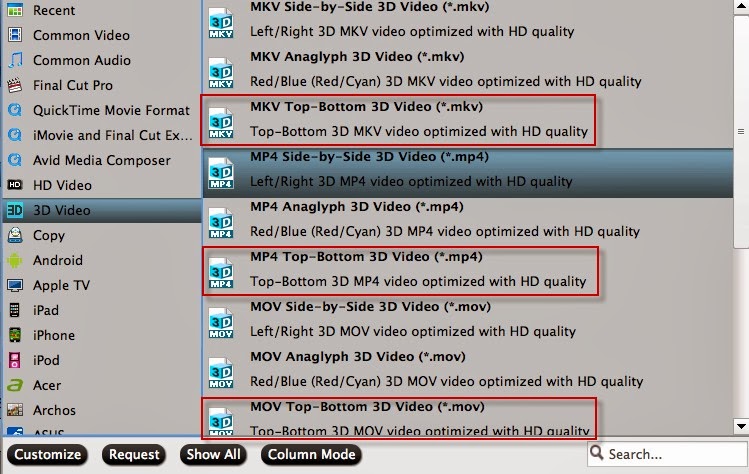
Click "Format" bar and move mouse to "3D Video" column, you can choose either "MKV Top-bottom 3D Video (*.mkv)" or "MP4 Top-bottom 3D Video (*.mp4)" or "MOV Top-Bottom 3D Video (*.mov)" as output format. If you want to output Anaglyph 3D or Side-by-Side 3D, you could choose it according to your specific need.

rip 3d blu-ray to SBS/Top-Bottom/Anaglyph 3D format

Tip: If you want to output the format with multiple audio tracks and subtitle sincluded, Pavtube ByteCopy for Mac is your best choice to meet your demand. (Guide: Whats the difference between profiles under Lossless/encoded Multi-Track and HD Media Player in ByteCopy?)

3. Start rip 3D Blu-ray to MP4/MKV/MOV Top-Bottom 3D

When everything is OK, just press the "Convert" button to start the conversion. It will not take much time. Just wait for the conversion process to get done. Once the conversion finished, you are able to get 3D MP4/MKV/MOV files via clicking "Open" button.

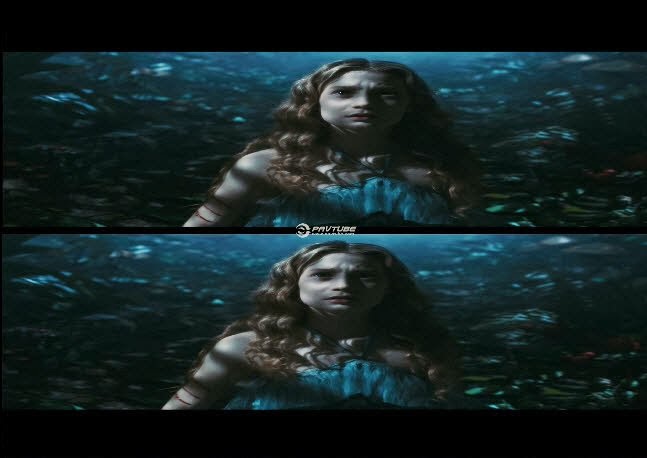
The image below is the top-bottom effect when viewing without putting on glass.


When play the MKV/MP4/MOV 3D Blu-ray on your TV, You may find it comes up in two screen, just hit the 3D button on your TV, and it will pop up a window saying put on your glasses, choose "OK". Another window appears showing your 3D choice: top-buttom.

Put on your 3D glasses, and then just enjoy 3D Movies!

You May Also Like:
Read More..

Copyright © 2010 Download PC Software | Powered By Blogger