Tampilkan postingan dengan label program. Tampilkan semua postingan

How to reset epson T13 using Epson Adjustment Program

Senin, 24 Maret 2014

0 komentar
Blinking error message on epson T13 is common when T13 printer lights blinking and the printer can not be operated because the monitor screen shows the counter has reached the limit printing
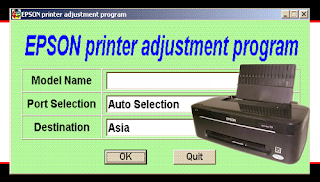
How to reset epson T13 using Epson Adjustment Program

Follow these steps below how to Reset Epson T13 Printers using Epson Adjustment Program
  • Download resetter printer T13
  • Run Epson Adjustment Program (AdjProg.exe)
  • Click accept and click select
  • Specify the printer brand
  • At the destination select EPS then click ok
  • Select the particular adjustment mode
  • Select waste ink pad counter then click ok
  • Click the check (counter 7500 printer needs to be reset)
  • Check the main pad counter and counter fl Boxes
  • Click initialization (to reset the printer counter)
  • Finish
  • Turn the printer off after 10 minutes then turn the printer
  • goog luck...
Download Epson Adjustment Program for T13 from link below
link
Read More..

Ultra AutoCAD Tool 2 4 171 Ultra Fast Utility Program For AutoCAD Drawing Files

Senin, 17 Maret 2014

0 komentar
Ultra AutoCAD Tool is an ultra-fast utility program for AutoCAD drawing files. Features include: Extract data from drawing files (CSV,XML,HTML) and import to a database or Excel Workbook, Create DXFs from DWGs, find and replace text, find and replace block attribute values, find and delete text objects, find and delete block attribute objects, find and delete block objects, set Layer status (on/off/thawed/frozen), save drawings as older version, find and replace image paths, find and replace external reference paths, etc.

Ultra AutoCAD Tool 2.4.171 - Ultra Fast Utility Program For AutoCAD Drawing Files
Ultra AutoCAD Tool does not require AutoCAD to be installed on your machine and is compatible with all AutoCAD drawing versions. Download Ultra AutoCAD Tool 2.4.171 - Ultra Fast Utility Program For AutoCAD Drawing Files
Read More..

Instructions How to Reset Ink Counter Using Adjustment Program

Minggu, 16 Februari 2014

0 komentar
Since your printer consumes ink not only for printing but also for other operations like cleaning, a certain amount of ink is wasted and it is collected by the waste ink pad. Therefore, the printer counts the amount of waste ink.
Once the amount of waste ink reaches the predefined limit, the printer indicates "MAINTENANCE REQUEST" and the waste ink pad should be replaced. Also, you must reset the maintenance error condition and the waste ink counter value stored in EEPROM on the mainbord of the printer.

The adjustment program enables you to perform maintenance and adjustment functions such as:
* EEPROM initial setting
* Ink Pad Counter reset
* Initial Ink Charge
* Head ID Setting
* Top margin Adjustment
* Bi-D Adjustment
* USB ID Input

Note: This example shows you how to reset waste ink counter of Epson R280, R285, R290 printers. Other printer models may have different set of functions, and you must doublecheck the service manual for a specific printer that you are going to troubleshoot.
Warning: misuse of a program may damage printers EEPROM! Run the program under Window XP only.

Instructions to reset waste ink counter using adjustment service program for Epson R280, R285 and R290 printers.
Download the Epson R280 adjustment program from http://printeresetter.co.cc/
Save archive and unpack by WinZip or Winrar


Change PC date
to April 10 2008 or another date you need. Just doubleclick in the right bottom and change date


Run AdjProg.exe program under Windows XP. Press ACCEPT


In new window check Particular adjustment mode.


Then check Waste ink pad counter option.


Click CHECK for checkin counter value.


To reset waste ink counter check 2 times and press INITIALIZATION.


Then press ÎÊ.


Resetting process is for few seconds and looks like :


For finishing power off the printer. The data will save up in the printers EEPROM. There will appear message :

Switch the power ON and check the counters value.
Other printers adjustment programs work the same way.
Read More..

Copyright © 2010 Download PC Software | Powered By Blogger